I love building things. But only if they bring value.
So when vibe coding suddenly became popular, I really wanted to jump on this bandwagon, but in a way that made sense to me.
Soon, I saw an opportunity: using Claude Code, I built a mobile-friendly web app for my local kayak club that replaced an old spreadsheet. Instead of building something for personal use, I created an app that is used by 170 kayakers every week.
In the beginning was the Spreadsheet
Spreadsheets are universally loved by organizations and people. Versatile, accessible, and affordable. What's not to like here?
But they are also quite difficult to manage. Too many cooks spoil the broth. The same happens with spreadsheets. Once more than one person is editing it, everyone gets an opinion on the color scheme, column names, formatting, and more.
In other words, multiple users in one spreadsheet create chaos and multiply it.
That's exactly what was happening in the kayak club.
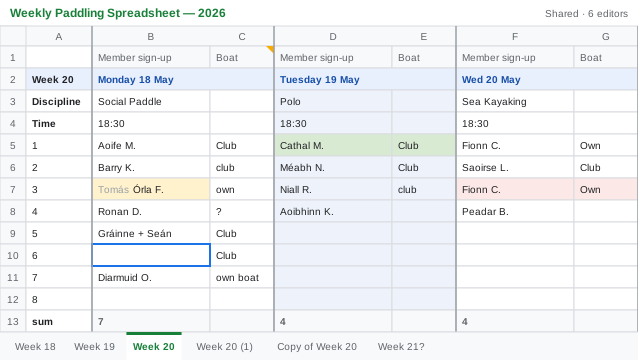
Every Sunday evening, a Committee member was setting up a new sheet on Google Sheets with events for the following week. People were waiting for it, rushing to sign up, overwriting each other's names, moving cells around, and accidentally creating copies of tabs. This wasn't a nice experience for anyone.
"It can be done better", I thought. But I was biased. I got my degree in corporate finance and I love spreadsheets. So my first thought was to look into macros or custom add-ons. In reality, the spreadsheet was already bursting at the seams. I was trying to optimize for chaos.
That's where I took a pause. Instead of jumping straight into building, I started asking questions.
Know your audience
I wanted to understand the problem deeply, both for club members and the Committee. So I decided to talk to people and find out about their experience with the Spreadsheet, frustrations, points of friction, and preferences.
That's what marketers do: they talk to users. Audience research is an important step but it rarely gets any spotlight in vibe coding because most examples include apps for personal use. And if it's personal use, audience research is just self-reflection and journaling.
In the case of the kayak club, talking to different people revealed interesting insights that I wasn't aware of. It wasn't just about breaking formulas or overwriting data. Two groups, two very different problems:
The biggest obstacle was the time it took to set up new sheets, archive old ones, and maintain them.
Using Google Sheets on the go, from a phone, wasn't a nice experience. Google Sheets wasn't designed for mobile.
Without this research, I would have identified the wrong problem. Building macros or add-ons, as I initially planned, wasn't the right thing to do. It wouldn't have saved anyone's time or minimized the maintenance complexity.
My ambitious goal was to build a standalone app. I started reading about React, Postgres, Supabase, and Vercel. AI made it simple to build apps, so I got carried away quickly. But the more I read, the less convinced I became. Was it really necessary? Was it solving the problem?
On one hand, with great power comes great responsibility. On the other, you'd want a bit of wisdom in the mix too. And every power has its limits. A local sports club has a volunteer-based Committee. It needs a simple, low-cost, low-maintenance solution that can serve the ever-changing Committee that rarely has the same people every single year.
I was very tempted to chase a shinier stack. But this would have gone against what I learned as a product marketer: meet your audience where they are.
The club ran its day-to-day activities on Google infrastructure. The website was on Google Sites, the newsletter went out through Google Contacts, and email ran on Gmail. The stack decision was obvious: the whole thing can run on Google Apps Script, with a Google Sheet as the database.
- The sheet holds events, boats, sign-ups, config — everything
- Apps Script serves the mobile web app and handles all writes
- The committee admins the whole thing by editing the sheet, a tool they already know
- Google handles hosting, identity, HTTPS, uptime, rate limiting, and every other boring-but-essential thing for free
Building a web app
Building something from scratch means first getting clear on what exactly you're trying to achieve.
So I asked Claude to rigorously interview me to get to know the club processes, the edge cases, boat availability, and many other things an outsider would never know.
All of this went into the project scope. It covered:
- Who the product is for (members and committee, with their different needs and problems)
- Who it's not for (not the general public, not paying customers, not a platform for other clubs)
- The exact week-by-week behavior I wanted (specific to our club)
- Separate logic for separate kayaking disciplines, waitlists, cancellations, headcount caps, and more
- A list of everything I was explicitly not building in v1
That last section is the one I'm very proud of. Scope creep has always been a problem in project management, but it's getting a new life in the AI era. When everything seems possible, it's not about "Can we build it?" but "Should we?"
Every "no" made the v1 sharper. But more importantly, it made the app click for users. That was positioning.
The fancy version of this app — React, Vercel, Supabase, custom admin — would have cost more, taken longer, and still not solved the immediate problem. The Club didn't need a mobile app. It needed a way to manage weekly sign-ups better.
For coding, I worked with Claude Code in the terminal:
- Mobile-first card UI, Apple HIG–style
- Sign up / cancel / waitlist / auto-promote functionality
- 324 unit test cases, organized into 41 sections
The full stack included:
- Google Apps Script for backend and serving the web app
- Google Sheets as the database and the admin interface
- HTML + vanilla JS + CSS for the frontend
- Claude Code as the main coding tool
- Node.js for the unit test harness on the pure-logic layer
- GitHub for version control
The takeaway
When we talk about vibe coding, we often talk about speed.
AI made building more accessible and faster. That shifted all the leverage to the one thing: figuring out exactly what to build, for exactly whom, with exactly which edges, in exactly which order.
My work on this web app is not finished. I have bigger plans. But I'll make sure that whatever it is I'm building, it's providing real value to end users.
Want the technical side? Read how I handled caching and cache invalidation in this app.